
OKX · API Hands-On
How are OKX API rate limits counted: per IP, account or instrument?
The sub-account rule in the OKX API docs, "a maximum of 1000 order requests per 2 seconds", does not work out to 500 orders a second fired at one contract. On a single instrument ID, the single-order endpoint POST /api/v5/trade/order accepts only 60 requests per 2 seconds. The 1,000 covers new orders and amendments across every instrument in the sub-account; the 60 covers one instrument on one endpoint. Both apply at once, and whichever fills first is the one that rejects the request.
OKX API rate limits have no single requests-per-second figure. Public market data endpoints are counted by IP address, private endpoints by User ID (each sub-account has its own User ID), order placement, cancellation and amendment go down to the instrument ID, and WebSocket login and subscription are counted per connection. An ordinary breach returns error code 50011; going over the sub-account's 1,000 returns 50061.
Which OKX endpoints are limited per IP and which per User ID
It depends on whether the endpoint needs authentication. Public market data endpoints, called without an API key signature, draw on an allowance tied to the outgoing IP address. Signed private endpoints are tied to the User ID, with the master account and each sub-account counted separately. Here are eight endpoints a trading script might call:
| Endpoint | Rate limit | Counted by |
|---|---|---|
| GET /api/v5/market/ticker | 20 requests per 2s | IP |
| GET /api/v5/market/tickers | 20 requests per 2s | IP |
| GET /api/v5/market/books | 40 requests per 2s | IP |
| GET /api/v5/market/candles | 40 requests per 2s | IP |
| GET /api/v5/account/balance | 10 requests per 2s | User ID |
| GET /api/v5/trade/orders-pending | 60 requests per 2s | User ID |
| GET /api/v5/trade/order | 60 requests per 2s | User ID + Instrument ID (Instrument Family for options) |
| GET /api/v5/trade/account-rate-limit | 1 request per second | User ID |
For the rows counted by IP, several scripts on one machine share a single allowance when they pull public market data, even if they hold API keys from different accounts. Private endpoints are counted differently: each sub-account has its own User ID, and the allowance is counted per User ID.
WebSocket has rules of its own. Connecting is limited to 3 requests per second per IP. On each connection, subscribe, unsubscribe and login requests together are limited to 480 per hour, and the connection breaks automatically if no subscription is established, or no data has been pushed, for more than 30 seconds. For private channels such as orders, account and positions, a sub-account can hold at most 30 connections on the same channel.
How many order, cancel and amend requests OKX allows per 2 seconds
The three kinds of request have independent allowances: once the 60 for placing orders are used, the 60 for cancelling are still there. Allowances are defined per User ID + Instrument ID, so BTC-USDT-SWAP and ETH-USDT-SWAP each have their own. Options are the exception. Their limits are defined at the Instrument Family level, and the Get instruments endpoint shows which Instrument Family an option belongs to.
| Endpoint | Rate limit | Counted in | Counts toward the sub-account limit |
|---|---|---|---|
| POST /api/v5/trade/order | 60 requests per 2s | Requests | Yes |
| POST /api/v5/trade/batch-orders | 300 orders per 2s | Orders | Yes, each order individually |
| POST /api/v5/trade/amend-order | 60 requests per 2s | Requests | Yes |
| POST /api/v5/trade/amend-batch-orders | 300 orders per 2s | Orders | Yes, each order individually |
| POST /api/v5/trade/cancel-order | 60 requests per 2s | Requests | No |
| POST /api/v5/trade/cancel-batch-orders | 300 orders per 2s | Orders | No |
- Multiple-order endpoints and single-order endpoints have separate allowances too. A multiple-order request carrying 5 orders uses 5 of the 300. When a multiple-order request carries only 1 order, it is counted as a single order and comes out of the 60.
- Placing, cancelling and amending share their limits across REST and WebSocket, so moving order placement from REST to WebSocket does not produce a second 60. Market data over WebSocket is bound by the connection limit and by the subscribe and login count on each connection, which are separate from the trading allowances here.
- An order can have at most 3 amend requests in progress at the same time. A further amend request submitted while 3 are still in progress is rejected with 51513.
- Copy trading lead traders have far lower limits on their lead instruments: 4 requests per 2 seconds for placing an order and for amending one, and 4 orders per 2 seconds on the multiple-order endpoints for placing and amending.
Add up what one instrument allows: 60 single-order requests plus 300 orders through the multiple-order endpoint come to at most 360 new orders in 2 seconds, and amendments are the same 60 + 300 = 360. New orders and amendments together make 720, short of 1,000. On that arithmetic, a script trading a single instrument runs into the instrument-level 50011 first, and the sub-account's 1,000 only comes within reach when several instruments are traded at once.
Error 50061 means the sub-account hit its 1,000 requests per 2 seconds
50061 comes back with the message "You've reached the maximum order rate limit for this account." The code for an endpoint's own limit, 50011, reads "Rate limit reached. Please refer to API documentation and throttle requests accordingly." 50061 belongs to the sub-account rate limit: each sub-account is allowed a maximum of 1,000 order requests per 2 seconds. Only new order requests and amendment requests count toward it, so cancellations do not, and in a batch request with multiple orders each order is counted individually. The endpoints it covers are the REST Place order, Place multiple orders, Amend order and Amend multiple orders, together with the WebSocket Place order, Place multiple orders, Amend order and Amend multiple orders. It operates in parallel with the limit per instrument ID, and a request has to satisfy both.
An example: a script runs three perpetual swaps at once and, within 2 seconds, uses all 60 single-order requests and all 300 multiple-order slots on each, for 360 × 3 = 1,080 new orders. No single instrument is over its own limit, but the sub-account total has passed 1,000, and the error that comes back is 50061, not 50011.
The fill ratio section of the docs includes this line: "Block trading, spread trading, MMP and spot/margin orders are exempted from the sub-account rate limit." (MMP is Market Maker Protection, OKX's mechanism for market makers to pull their quotes.) So orders from a spot-only script do not count toward the 1,000, and the limit it mainly has to watch is the 60 requests per 2 seconds on each instrument. Even so, keep the local counter for the sub-account total in place, and if a 50061 does arrive, handle it as follows.
On a 50061, slowing only the pair that returned the error may not be enough. The allowance is shared by every instrument in the sub-account, so the figure to bring down is the total of new orders and amendments across all of them. Cancellations do not count toward this limit; cancel what needs cancelling as usual.
From VIP5 up, the sub-account limit has 8 tiers set by fill ratio
These tiers apply only to users at VIP5 and above. For them, a sub-account's cap on new orders plus amendments per 2 seconds is set by its fill ratio, in 8 tiers from 1,000 to 10,000.
At 00:00 UTC each day, the system calculates two ratios from the past 7 days of data:
- Sub-account fill ratio = the sub-account's trade volume in USDT ÷ Σ(new and amendment request count per symbol × symbol multiplier). The master trading account is itself treated as a sub-account here.
- Master account aggregated fill ratio = the trade volume in USDT at master account level ÷ Σ(new and amendment count per symbol × symbol multiplier, over all sub-accounts).
Only successful order requests (sCode=0) are counted. Block trading, spread trading, MMP and fiat orders are left out of the order count, and block trading and spread trading are left out of the trade volume.
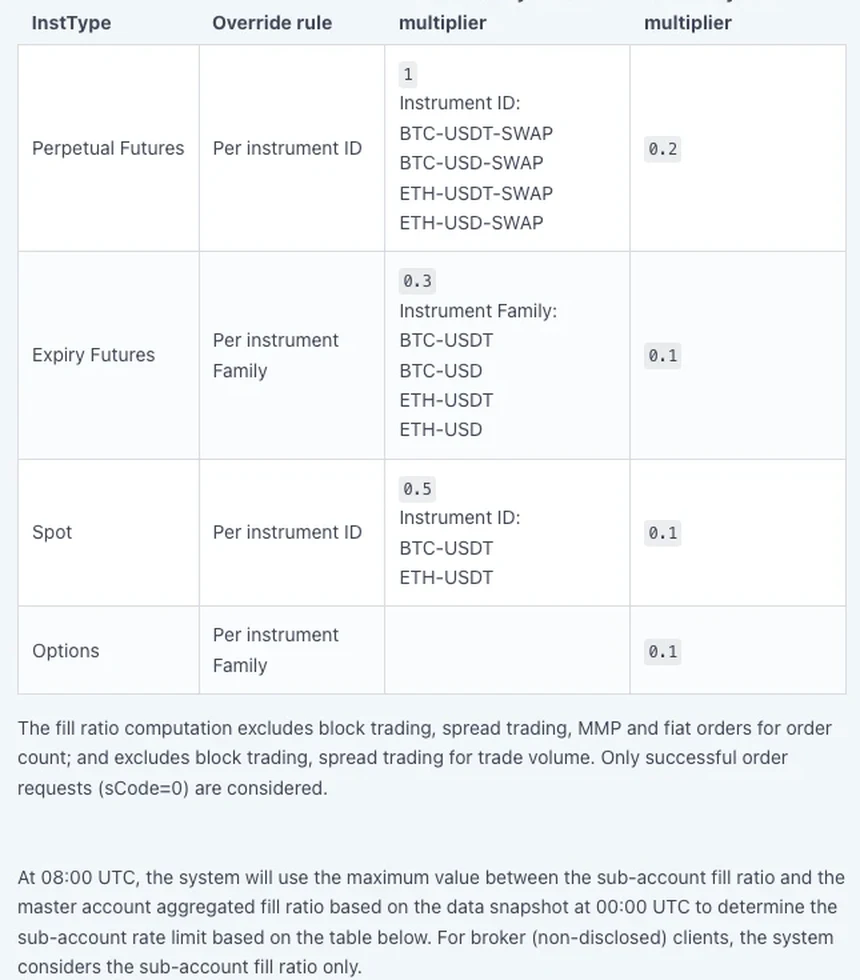
The symbol multiplier adjusts the weight of each symbol in the ratio. A smaller multiplier (below 1) is used for smaller pairs that need more updates per unit of trading volume, so each of their requests weighs less in the denominator. Every instrument has a default multiplier, and some have an overridden one:
| InstType | Override rule | Default symbol multiplier | Overridden symbol multiplier |
|---|---|---|---|
| Perpetual Futures | Per instrument ID | 0.2 | 1: BTC-USDT-SWAP, BTC-USD-SWAP, ETH-USDT-SWAP, ETH-USD-SWAP |
| Expiry Futures | Per instrument family | 0.1 | 0.3: BTC-USDT, BTC-USD, ETH-USDT, ETH-USD |
| Spot | Per instrument ID | 0.1 | 0.5: BTC-USDT, ETH-USDT |
| Options | Per instrument family | 0.1 | — |
Spot orders are exempt from the sub-account rate limit, yet Spot still has a row in the multiplier table, and XRP-USDT's trade volume and order count go into the ratio in the calculation further down.
At 08:00 UTC each day, the system takes the 00:00 UTC snapshot, uses the larger of the sub-account fill ratio and the master account aggregated fill ratio, and sets the sub-account's rate limit from this table:
| Tier | Fill ratio [x ≤ ratio < y) | Sub-account rate limit per 2 seconds (new and amendment) |
|---|---|---|
| Tier 1 | [0, 1) | 1,000 |
| Tier 2 | [1, 2) | 1,250 |
| Tier 3 | [2, 3) | 1,500 |
| Tier 4 | [3, 5) | 1,750 |
| Tier 5 | [5, 10) | 2,000 |
| Tier 6 | [10, 20) | 2,500 |
| Tier 7 | [20, 50) | 3,000 |
| Tier 8 | ≥ 50 | 10,000 |
How a tier moves:
- When the fill ratio improves and the rate limit is to be raised, the uplift takes effect immediately at 08:00 UTC.
- When the fill ratio falls and the rate limit has to be lowered, there is a one-day grace period, and the lowered limit is only applied on T+1 at 08:00 UTC. If the ratio has improved by T+1, the higher limit is applied instead.
- A client demoted to VIP4 has the rate limit downgraded to Tier 1, also with a one-day grace period.
- A sub-account whose 7-day trading volume is below 1,000,000 USDT is given the fill ratio of the master account.
- A newly created sub-account starts on the Tier 1 limit, and the normal rules apply from T+1 at 08:00 UTC.
The worked example in the docs has three accounts, with a symbol multiplier of 1 for BTC-USDT-SWAP and 0.1 for XRP-USDT. Running its numbers through the two formulas:
| Account | Trade volume (USDT) and order count | Ratio | After taking the larger value |
|---|---|---|---|
| A (master account) | BTC-USDT-SWAP 100 / 10 orders; XRP-USDT 20 / 15 orders | 120 ÷ (10 × 1 + 15 × 0.1) = 120 ÷ 11.5 ≈ 10.43 (the docs show 10.4) | 10.43 → Tier 6, 2,500 per 2s |
| B (sub-account) | BTC-USDT-SWAP 200 / 100 orders; XRP-USDT 20 / 30 orders | 220 ÷ (100 × 1 + 30 × 0.1) = 220 ÷ 103 ≈ 2.14 (the docs show 2.13) | 3.01 → Tier 4, 1,750 per 2s |
| C (sub-account) | BTC-USDT-SWAP 300 / 100 orders; XRP-USDT 20 / 45 orders | 320 ÷ (100 × 1 + 45 × 0.1) = 320 ÷ 104.5 ≈ 3.06 | 3.06 → Tier 4, 1,750 per 2s |
| Master account aggregated | Volume 660; denominator 10 + 1.5 + 100 + 3 + 100 + 4.5 | 660 ÷ 219 ≈ 3.01 | — |
In that example, Account C's BTC-USDT-SWAP order count is listed as 1000, while the formulas for Account C and for the master account aggregate both use 100; the table here follows the formulas. The volumes in the example are small demonstration numbers. On a real account, a sub-account with less than 1,000,000 USDT of 7-day trading volume has the master account's fill ratio applied to it.
Checking your current OKX rate limit, and retrying after a rejection
The current allowance comes from GET /api/v5/trade/account-rate-limit, the account rate limit endpoint, which is itself limited to 1 request per second per User ID. It returns the sub-account fill ratio, the master account aggregated fill ratio, the current sub-account rate limit and the sub-account rate limit on T+1 (the field to read when the limit is about to be lowered). The data is updated daily at 08:00 UTC, so a script can read it once after that hour and store the result for the day, with no need to query before every order.
Count locally on three levels. Each instrument gets one counter each for placing, cancelling and amending, over 2 seconds. New orders plus amendments across every instrument in the sub-account go into one total, compared against the sub-account limit you read. For WebSocket, track connections opened per second and the subscribe and login requests on each connection. On a reconnect, don't let several connections rebuild in the same second, and don't unsubscribe and resubscribe over and over on one connection.
For many orders concentrated on one instrument, the two placement endpoints carry different allowances: 60 requests per 2 seconds on the single-order endpoint, 300 orders per 2 seconds on the multiple-order endpoint. Going through the multiple-order endpoint does not widen the sub-account cap, since each order still counts individually toward the 1,000. With amendments, wait for earlier results to come back before sending more: an order can have 3 amend requests in progress at once, and a further one submitted while those 3 are still pending is rejected with 51513.
| Error code | Which limit was hit | What the script does |
|---|---|---|
| 50011 | An endpoint's own rate limit (by IP, User ID or instrument ID) | Slow this endpoint down, back off, then retry |
| 50061 | The sub-account's total of new orders plus amendments per 2 seconds | Slow new orders and amendments across the whole sub-account; cancel as usual |
| 51513 | 3 amendments already in progress on the same order | Wait for the earlier amendments to return before submitting another |
A retry loop needs a wait that lengthens from one attempt to the next and a point at which it gives up; the OKX API errors checklist has that back-off code. If you don't have an API key yet or haven't placed a demo order, start with getting a demo key and placing and cancelling a first order. For grid bots run over the API, see the parameters for creating one and the calls for querying its state.
OKX API rate limits: questions and answers
How many orders per second can the OKX API place?
OKX counts over 2 seconds. On one instrument, the single-order endpoint allows 60 requests per 2 seconds and the multiple-order endpoint 300 orders per 2 seconds; the two allowances are independent, and options are counted by Instrument Family. At sub-account level, new orders plus amendments are capped at 1,000 per 2 seconds, and from VIP5 up the cap is tiered by fill ratio, reaching 10,000 at the top. REST and WebSocket order placement share these allowances.
How do I fix OKX API error 50061?
OKX returns 50061 with the message: You've reached the maximum order rate limit for this account. It means this sub-account's new order and amendment requests in 2 seconds went over its rate limit, 1,000 by default, with each order in a batch request counted individually. Slowing only the pair that returned the error may not be enough: slow order placement and amendments on every instrument in the sub-account. Cancellations do not count toward this limit. The docs state that spot and margin orders are exempted from the sub-account rate limit, so orders from a spot-only script do not count toward the 1,000; if a 50061 does arrive, slow down the same way.
Does placing orders over WebSocket give me an extra rate limit allowance?
No. Rate limits for placing, cancelling and amending orders are shared across REST and WebSocket, so switching channel adds nothing, and WebSocket order management is counted by User ID as well. WebSocket has connection limits of its own: 3 connection requests per second per IP, and 480 subscribe, unsubscribe and login requests per hour on each connection.