
OKX · Bot Troubleshooting
OKX Grid Bot Stopped? First Work Out Which Kind of Stop It Is
Two things need separating first: a bot that has stopped placing orders and a bot that has actually stopped are not the same event. When price moves past the upper or lower limit you set, OKX says the bot will “stop placing orders” — the bot has not ended, and whatever it already bought is still in the position. Hitting the take-profit price, hitting the stop-loss price, stopping it yourself, or the asset being suspended or delisted is what stops the bot itself, and for the first three, OKX states plainly that the assets are sold at market price.
What comes next is completely different in each case. In the first, you still hold coins and still have a bot that hasn't ended. In the second, if it was a take-profit, a stop-loss or a manual stop, OKX's own wording says the assets have already been sold at market price and the position is closed. So don't rush to launch a new one. Everything below has been checked line by line against OKX's Spot Grid help page (English, OKX Singapore site), which shows “Updated on 5 Aug 2026”. This article covers spot grid only; that page doesn't cover how futures grid, DCA or signal bots stop, so don't stretch any of this to them.
Two kinds of stop: no new orders vs. the bot stopping
There is one test, and it is the verb in OKX's sentence: does it say the bot will “stop placing orders”, or that it will “stop working”?
Both range limits use the first verb, and elsewhere the same page adds that below the lower price the bot places no additional orders. What stops is the order placing, nothing more.
The take-profit and stop-loss lines switch to the second verb and add that the bot sells all base assets at market price. A separate sentence on the same page says a manual stop also sells your assets at market price. The table below gives OKX's exact wording for each case.
| What you see | Which kind of stop | Still holding? | OKX's wording |
|---|---|---|---|
| Price above the upper limit | Stops placing orders | Yes | “Upper limit: The bot will stop placing orders when the market price is higher than the highest price.” |
| Price below the lower limit | Stops placing orders | Yes | “If the price falls below the lower price of the defined price range, the bot will not continue to place additional orders.” |
| Price reaches the take-profit price | Bot stops working | Sold at market price | “Take-profit (TP) price: The Bot will stop working when the price reaches TP price, and the bot will sell all base assets at corresponding market price.” |
| Price falls to the stop-loss price | Bot stops working | Sold at market price | “Stop-loss (SL) price: The Bot will stop working when the price falls to the SL price, and the bot will sell all base assets at corresponding market price.” |
| You stopped it manually | Bot stops | Sold at market price | “Your assets will be sold at market prices when the Bot is stopped manually or when the stop-loss price is triggered.” |
| Asset suspended or delisted | Bot stopped automatically | Not stated | “…encounters unpredictable circumstances such as suspension or delisting of the underlying crypto asset, the bot will be automatically stopped.” |
One more thing that's easy to misread: when you create a bot, “the initial funds will be isolated from your Trading account and used for grid trading only”. Not seeing that money in your trading account doesn't mean the bot has stopped; it was set aside the moment the bot was created.
How to choose the parameters in the first place is outside this article; range, grid count and investment amount are covered in How to Set Up an OKX Grid Bot. This one only deals with why a running bot stops.
Price leaves the range: the two sides carry different risk
Leaving the range is the most common case. OKX words the two sides symmetrically: as the table above shows, above the highest price or below the lowest price, both lines use the same “stop placing orders” wording.
The consequences are not symmetrical, though, which is why the page offers advice for the lower side only.
No new orders above the upper limit costs you the upside: price keeps climbing and the bot sits it out, leaving you with whatever the grid holds after selling its way up the levels. Annoying, but the risk is capped.
No new orders below the lower limit leaves the position unattended: the base asset bought inside the range is still held, price keeps falling, and the bot neither buys more nor sells for you. Right after its no-new-orders line for the lower side, OKX goes on: “If the price continues to fall and does not return back to the pre-defined range, the crypto asset held at this time will suffer losses. Therefore, it is recommended to set a stop-loss price below the lower price to avoid taking excessive risk on your position.” That “Therefore” is the point — the stop-loss price is there to deal with exactly this stretch below the lower limit, where no other mechanism takes over.
Does the bot start placing orders again once price comes back inside the range? The page doesn't say, so don't assume it does. Check the bot's detail page for new orders and fills: if they're there, it's still running; if there are none, assume it hasn't resumed.
Take-profit or stop-loss hit: a market-price exit
A take-profit or stop-loss trigger is a market-price exit. It isn't a pause, and it doesn't leave a limit order sitting there for you.
As the table above shows, the two lines are built the same way: once price reaches the take-profit price or falls to the stop-loss price, the bot stops working and sells all base assets “at corresponding market price”.
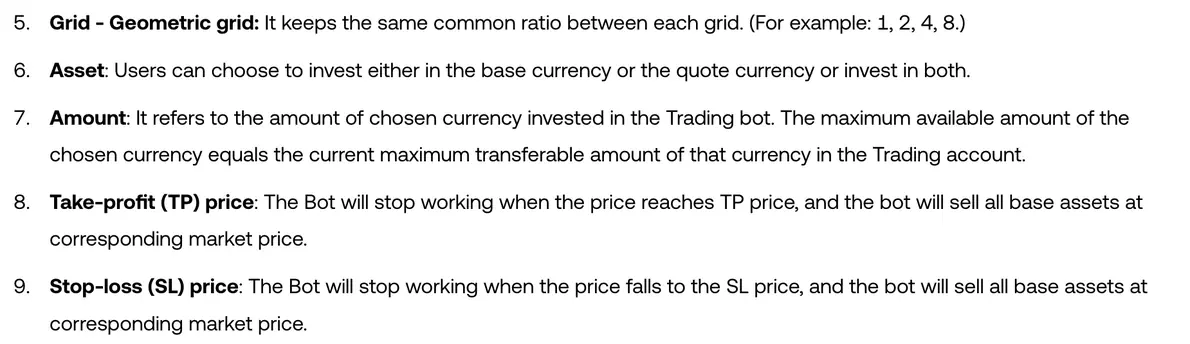
Read “at corresponding market price” carefully: the stop-loss price you enter is a trigger, not a fill price. What you actually sell at depends on the order book at the moment it fires, and in a fast market it can land well below the number you typed.
If price climbs back after the exit, the bot won't buy back in on its own — it isn't running any more. Whether that cost is acceptable depends on what kind of market you think you're in, which is a separate topic: The Same Strategy Makes Money in a Trend and Bleeds in a Range.
A set of made-up numbers: range 90–110, stop-loss 85
Here is a set of made-up round numbers to tie the last two sections together. They are purely illustrative and don't correspond to any asset or real market.
Assume a range of 90–110 and a stop-loss price of 85.
- Price at 95. Inside the range. The bot keeps placing buy and sell orders on its levels; nothing has stopped.
- Price at 88. Below the lowest price of 90. Under the lower-limit rule in the table above, new orders stop. The bot has not ended, and the base asset it bought above 90 is still in the position; each unit bought inside the range carries its own unrealised loss from its purchase price down to 88, and that loss is yours to carry.
- Price at 85. The stop-loss price is hit. Under the stop-loss rule, the bot stops and the base asset is sold at whatever the market price is at that moment — not necessarily exactly 85.
Now run it again with the stop-loss at 92. Price falls from 110, touches 92 first and the position is closed; the levels between 90 and 92 never get used once. That is the arithmetic behind OKX's advice to keep the stop-loss below the lower price: a stop-loss placed inside the range cuts off part of the bot's own working area.
And with no stop-loss at all: 88, 80, 70 on the way down, and the whole time the bot simply places no new orders. The position stays open and takes the full fall. On that path, nothing on this page puts any automatic brake on the decline.
Asset suspended or delisted: the bot stops automatically
One case has nothing to do with the parameters you entered. As the last row of the table shows, a spot grid bot that runs into “unpredictable circumstances such as suspension or delisting” of the underlying asset is stopped automatically.
Note the “such as”: suspension and delisting are examples, not a complete list. The pattern is easy to spot — you check the take-profit and stop-loss prices, price never reached either of them, nobody stopped it by hand, and yet the bot is no longer running.
Unlike take-profit, stop-loss and a manual stop, the page doesn't say what happens to the base asset here, so don't apply the stop-loss logic to it. Check the actual fills and asset records in your account.
How to tell which one you've run into
Start from what you can see on screen. Labels can differ between app versions, so treat the wording below as a guide to what your own app shows.
The bot still shows as running, but nothing has filled for a long time. First check whether price is still inside the range. If it is, the bot is most likely just sitting between two grid lines, not stopped. If it isn't, price has left the range: compare the current price with the upper and lower limits you entered when you created the bot, and above the upper or below the lower confirms it. Your holdings are still there, and the decision is whether to wait for price to come back into the range or end the bot yourself.
The bot is no longer among the running ones. Check three things in turn:
- whether the take-profit or stop-loss price you set was touched, compared against the high and low over that period;
- whether there is an announcement that the coin was suspended or delisted;
- whether anyone stopped it — including another device on the same account, or a program with permission to place orders.
If these three checks don't settle it, don't close the case from memory; go through the trade and order history in your account. Noting down the range limits and the stop-loss price when you create a bot gives you something to check against later, which beats trying to reconstruct them after the fact.
FAQ
After price leaves the range, has the bot stopped?
Not in the sense of ending. OKX's Spot Grid help page says that above the highest price or below the lowest price the bot will “stop placing orders”, and that below the lower price it places no additional orders. What stops is the order placing; the bot itself is still there, and so is the position it has already built. That is a different thing from the bot actually stopping after a take-profit, a stop-loss or a manual stop.
Once price is back inside the range, does the grid start placing orders again by itself?
The help page doesn't say: it covers what happens when price leaves the range, not what happens when it returns. Check the orders on the bot's detail page: new orders and fills mean it is still running; if there are none, assume it hasn't resumed.
After the stop-loss price is hit, do I still hold the coins?
Not according to the help page. It says that once price falls to the stop-loss price, the bot stops working and sells all base assets at the corresponding market price, and another sentence on the same page says a manual stop sells your assets at market price too. That is a market-price exit, not a pause, and if price climbs back afterwards the bot won't buy back in on its own. Keep in mind that the stop-loss price is the trigger; the fill happens at the market price when it fires.
Why does OKX recommend putting the stop-loss below the lower limit of the range?
The help page ties it to what happens below the range: there the bot places no additional orders, and if price keeps falling without returning to the range, the assets held will suffer losses — hence its recommendation to set a stop-loss below the lower price to avoid taking excessive risk on your position. With no new orders but the position still open, any further fall is yours to absorb; a stop-loss below the lower limit gives that unmanaged stretch an exit point. A stop-loss placed inside the range instead cuts off part of the bot's own working area.
The bot is no longer running, but I set no take-profit or stop-loss and didn't stop it myself. What could it be?
First check whether the coin was suspended or delisted. The help page says a spot grid bot is stopped automatically when it runs into unpredictable circumstances such as a suspension or delisting of the underlying asset. It doesn't say what happens to the assets in that case, so check the fills and asset records in your account. Also rule out a stop from another device on the same account, or from a program with permission to place orders.
Once you know which kind of stop it is, what to do follows. If it has only stopped placing orders, decide whether to wait or wind it down yourself. If the bot stopped after a take-profit, a stop-loss or a manual stop, the position is already closed, and the only question left is whether to start a new one. Before restarting, the parameters section of How to Set Up an OKX Grid Bot covers how to pair the range with a stop-loss.