
OKX · Account Opening
OKX Sign-Up, KYC and Security Setup, Step by Step
Before you trade on OKX or run a script against it, you need an account that is verified and has two-factor authentication set up. Sign-up asks for both an email and a phone number, and the invite code goes in on the email step. Verification means submitting your own ID and a selfie. The first security settings to turn on are 2FA and the anti-phishing code.
* Subject to OKX's current rules · The button is our referral link
Step 1: Register with your email and phone
When you register on OKX (also written OKEx), you bind both an email and a phone number. OKX's Help Center page How do I register an account on OKX? states that "Both a phone number and an email address must be bound during registration." For the email, use one you check often and can keep receiving mail on for the long run, since account recovery and security alerts rely on it. The flow is:
- On the OKX homepage, select "Sign up." Pick your country of residence in the Country/region field, read the terms of service and accept them, then select Next.
- Enter your email address. The "Invite code / Referral code" field is on this same step; you can register with or without it, and what to put there is covered at the end of this section.
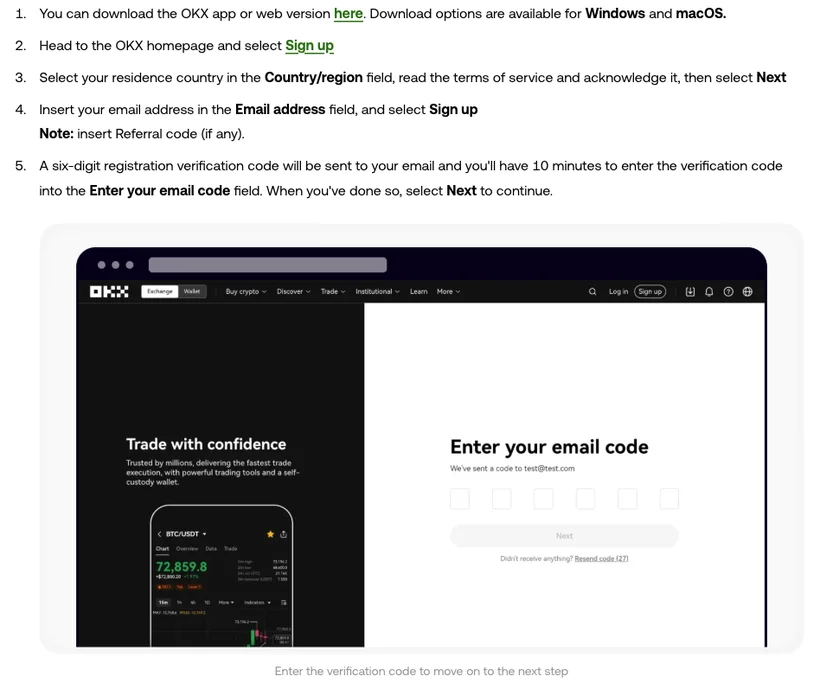
- A six-digit code is sent to your email. Enter it within 10 minutes and select Next.
- Next, add your phone number (with the country code) and enter the six-digit SMS code within 10 minutes as well.
- Finally, set a login password. Use one that's long and mixed enough, and don't reuse it from other sites. Once that's done, the account is created.
What to put in the invite code field: your account works whether or not you enter one, but the corresponding fee discount only applies if you do. OKX's Referral Program FAQ says "After account registration is complete, the Referral relationship usually can’t be added or changed." This site's invite code is OK30001; you can copy it from the card at the top of this guide, and the button next to it opens the OKX sign-up page that carries this code.
Step 2: What to prepare for KYC
Once the account is created, the next step is identity verification (KYC). OKX's Help Center page How do I verify an individual account? says "You can trade, deposit and make withdrawals after completing your identity verification."
Before you start, have these ready:
- Your own ID. Pick from the document types listed on the verification page. It must be valid, with a clear photo, all four corners visible, and no glare.
- A device with a camera. You take a selfie as prompted, and a phone is the easiest way to do it.
- A well-lit spot. Keep your face evenly lit and the background plain for the selfie.
The same page says "We'll review your application within 24 hours and you'll be notified instantly once we've completed it." Don't resubmit during that window.
Your verification details must match you. OKX's registration page states that "one identity document can only be linked to one OKX account", so don't use someone else's ID and don't register twice.
Step 3: Get your account security fully set up
Before you start depositing and trading, get the items below in place. An account can be stolen without the exchange getting hacked; personal security settings left undone are enough.
① Two-factor authentication (2FA)
2FA is a second gate beyond your password. OKX supports several methods, and we most recommend a TOTP app like Google Authenticator: it generates offline rolling codes, doesn't depend on SMS, and so isn't exposed to "SIM-swap" style attacks. When you bind it, be sure to write down and safely store that recovery key (OKX's guide to binding an authenticator app also stresses keeping it safe); you'll rely on it to restore when you switch phones. SMS verification can be a backup, but don't rely on it alone.
② Anti-phishing code
You set a string of your own, and after that the emails OKX sends you carry it. The help center's How can you protect yourself from a phishing attack? puts it as "the email sent by OKX will contain the anti-phishing code you set." A correct code only removes one doubt. Still don't click the links; check from inside the app instead. Per the same article, you set it in the OKX app under Menu > Security > Anti-phishing code.
About the "fund password" in older guides
A lot of older guides still have one more step here: set a fund password (also called a payment or trading password). OKX's current help article How do I make a withdrawal? (web) asks you to complete 2FA verification before confirming and makes no mention of a fund password. If you can't find the option in your security settings, there's nothing to look for; make sure the two items above are solid.
Step 4: Deposit methods at a glance
There are two ways to get funds into the exchange:
- C2C / fiat buy. Buy USDT on C2C with a fiat currency supported where you live (which currencies are available depends on the C2C page in your region; first make sure your country is within OKX's service area). This route has a low barrier and suits beginners. When you trade, check the counterparty's reputation and follow the platform's escrow flow; never transfer privately off-platform.
- On-chain deposit (transferring in crypto). If you already have coins elsewhere, withdraw them from there to your OKX deposit address. Here's a detail you cannot get wrong: the deposit address and the network (chain) must match exactly. USDT, for instance, has different networks like TRC20 and ERC20, and the network you choose when sending out must exactly match the network of the address OKX gives you. Pick the wrong chain and the coins may be unrecoverable (see the OKX Help Center article How do I select the correct network for deposits and withdrawals?). For your first transfer, we strongly suggest sending a small test amount first and only sending the larger amount after it arrives confirmed.
For quant, you first need some USDT as the pricing and order capital. How much depends on your strategy and your tolerance; use only spare money you can afford to lose entirely. Which account a deposit lands in, and how to move it to the trading account where orders are placed, is covered in OKX Funds Transfer: Where Deposits Land.
How the fee discount is paid and where to see it
It's easy to assume an invite code knocks your account down a fee tier. It doesn't. You're still charged at your normal fee tier; the share your referrer passes on (up to 20%) comes back to your account as a cashback credit, and the tier you see doesn't change.
To check it has landed, log in, open the funding account history under Assets, and look under “Activity rewards.” Exact rates change; go by what OKX currently publishes.
To estimate the fees themselves, use the fee calculator on our tools page: enter your rough trading volume and a fee rate and it gives you an estimate.
FAQ
I didn't enter an invite code at sign-up. Can I add it later?
OKX's Referral Program FAQ says that after account registration is complete, the referral relationship usually can't be added or changed, and it tells users not to delete the account or create another one to try to change the code. The registration page adds that one identity document can only be linked to one OKX account.
Do I have to complete identity verification (KYC)?
Yes, if you want to trade, deposit or withdraw: OKX's Help Center says you can do those after completing identity verification. Have your own ID ready and follow the prompts; OKX says it reviews applications within 24 hours.
What is an anti-phishing code, and is it worth setting?
An anti-phishing code is a string you set yourself. Per OKX's help center, once it's set, the email sent by OKX will contain the anti-phishing code you set, so an OKX email without it is a fake. Setting it is free; do it right after registration.
Do I still need to set a fund password on OKX?
OKX's current help article on withdrawals asks you to complete 2FA verification before confirming and makes no mention of a fund password. If an older guide tells you to set one and you can't find the option in your security settings, there's nothing to look for. Note: the login password and the API Passphrase are two separate things; don't mix them up.
Once the account is set up, the steps for creating an API key are in the OKX API Quant Starter (tick Read and Trade only, and leave Withdraw off). If you don't code, see Quant Trading Without Coding.