
OKX · Advanced API
OKX expects its WebSocket heartbeat as a plain-text ping string
A 30-second drop on an OKX WebSocket connection matches one of the two cases written into the OKX API docs: no subscription has been established, or no data has been pushed to you, for more than 30 seconds. To tell which one you're in, look at what comes back from your subscribe request. If no message with event subscribe arrives within 30 seconds of connecting, it's the first case; if one does, and the server then pushes nothing for 30 seconds, it's the second. A failed subscription comes back with event error. A script that sends requests without reading the replies won't notice the subscription failed, and the connection is dropped once the 30 seconds are up.
The second case, a successful subscription followed by silence, is what a heartbeat is for: a small message sent every so often to show the connection is still alive. The heartbeat OKX wants is a text message reading ping, and the server answers with pong. The Ping frames that Python's websockets library sends on its own in the background are a different kind of message. If your script talks to a WebSocket library directly and has never sent this string, add that step; if you connect through a wrapper library such as ccxt, how keepalive is handled is covered in that library's own documentation.
Send the string ping yourself before 30 seconds pass with no new message
The keepalive method in the docs' Connect section comes in three steps:
- Each time a message is received, set a timer of N seconds, with N less than 30.
- If the timer fires, meaning no new message came in within N seconds, send the string
ping. - Expect a
pongin reply; if it doesn't arrive within N seconds, raise an error or reconnect.
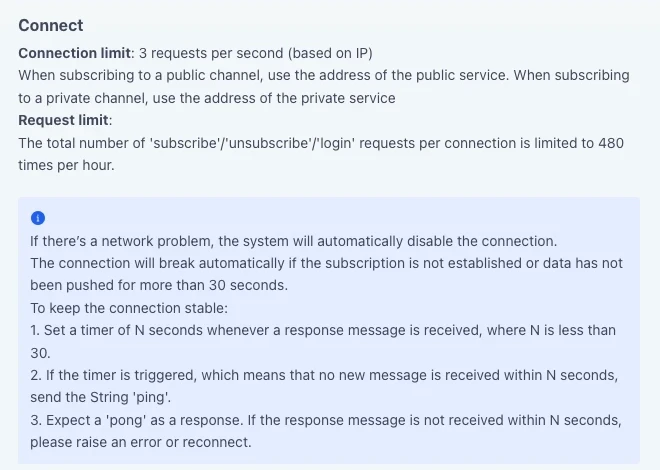
In step 1, any message you receive restarts the timer. On a busy channel the timer keeps resetting and you never send a single ping; only after N quiet seconds does step 2 come into play. The only requirement on N is that it be under 30, and the exact value is up to you.
The ping is just four letters of plain text, without the JSON structure a subscribe request has, and the pong that comes back is the same. If your script runs every incoming message straight through a JSON parser, pick out the pong before parsing.
Here are the three steps written with asyncio from Python's standard library. Swap recv and send for the coroutine functions your WebSocket library uses to receive and send one text message; handle is your own function for processing market data or order messages:
import asyncio

N = 20  # your own choice; the docs only require N to be under 30

async def keep_alive(recv, send, handle):
    # recv / send: your WebSocket library's coroutine functions that receive / send one text message
    while True:
        try:
            msg = await asyncio.wait_for(recv(), N)   # any message restarts the countdown
        except asyncio.TimeoutError:
            await send("ping")                        # no new message for N seconds: send the string ping
            msg = await asyncio.wait_for(recv(), N)   # wait N more seconds; TimeoutError only if nothing at all (pong included) arrives
        if msg != "pong":
            handle(msg)                               # everything else goes to your own handler
If the second N-second wait still brings no message at all, asyncio.TimeoutError propagates out of the function; that is step 3's error or reconnect, handled by whichever layer called it. If a market data message turns up after the ping and before the pong, the connection is evidently alive and the countdown starts over, and the pong that arrives later is skipped by the final check.
With Python's websockets library, the string ping goes out separately through send
The WebSocket protocol has a ping of its own. Text and binary messages travel in data frames, while Close, Ping and Pong are control frames that carry the state of the connection itself, as laid down in RFC 6455. A Ping frame has opcode 0x9; an endpoint that receives one must send back a Pong unless it has already received a Close frame, and a Ping can serve either as a keepalive or as a way to check that the other end is still responsive.
Python's websockets library has this kind of keepalive switched on by default: it sends a Ping frame every 20 seconds, and if no Pong comes back within 20 seconds it considers the connection broken and terminates it. Both timings are configurable through the ping_interval and ping_timeout arguments of connect(). Its documentation goes on to say that some servers require clients to send a keepalive message with specific content at regular intervals, usually as Text frames rather than Ping frames, which you must send with send; websockets treats this as application-level keepalive and leaves it to you to implement.
The string ping in OKX's Connect section belongs to the second kind. The library's keepalive sends control frames in the background and won't send this text for you, so when you follow the three steps, step 2 has to go out through the library's method for sending a text message, which in websockets is send.
OKX also has an SBE (Simple Binary Encoding) market data endpoint, /ws/v5/public-sbe, that is kept alive with control frames: the server sends Ping frames with opcode 9, the client must reply as soon as possible with a Pong frame with opcode 10 carrying a copy of the ping's payload, and if the server gets no pong within 60 seconds it disconnects. A script that connects to that endpoint follows its rules instead.
Reconnecting within the connection rate, subscription count and login expiry limits
New connections are capped at 3 requests per second, counted by IP. A script that loops straight back into reconnecting after a drop, with no wait, can send more connection requests than that in one second, and if several scripts run on the same IP, their connection attempts are counted together. Leave a gap between retries and lengthen it after each consecutive failure, an approach known as backoff. How long the gap should be is your call.
Subscribe, unsubscribe and login requests together are limited to 480 per connection per hour, 8 a minute on average. Logging in once after a reconnect and subscribing your channels again uses only a handful. The count climbs fast when a running script keeps unsubscribing and resubscribing: dropping one pair and subscribing another every 5 seconds is 12 × 2 = 24 requests a minute, or 24 × 60 = 1,440 an hour, three times the limit. One subscribe request can carry one or more channels, with the total length of multiple channels capped at 64 KB, so there's no need for a separate request per channel.
REST rate limits are set endpoint by endpoint and don't come out of the 480: GET /api/v5/account/positions, which you'd call after a reconnect to check positions, allows 10 requests per 2 seconds, counted by User ID.
Private channels need a login first. The timestamp in the login request is Unix Epoch time in seconds, and the request expires 30 seconds after that timestamp. If your reconnect code holds on to a timestamp and sign computed before the drop and uses them to log in more than 30 seconds later, the request has already expired. Take the current time and recompute the signature on every reconnect: concatenate timestamp, 'GET' and '/users/self/verify' into one string, apply HMAC SHA256 with your SecretKey, then Base64-encode the result. If your machine's clock differs from the API server time, OKX recommends querying the server time through the REST API and then setting the timestamp; the ts returned by GET /api/v5/public/time is in milliseconds, so convert it to seconds before use. A failed login returns a message with event error; in the docs' example, msg Login failed. comes with code 60009.
| Item | Limit or expiry | Counted by |
|---|---|---|
| Opening a WebSocket connection | 3 per second | IP |
| Subscribe, unsubscribe and login requests combined | 480 per hour | Each connection |
| Connections subscribed to the same restricted private channel | 30 | Each sub-account, each channel |
| Login request | Expires 30 seconds after the timestamp | The timestamp in the request |
| Subscribing to multiple channels | Total length up to 64 KB | All channels in the request |
Reconnect to the same address you used the first time: public channels go to the public service address and private channels to the private one, which for live trading are wss://ws.okx.com/ws/v5/public and wss://ws.okx.com/ws/v5/private, with a separate address for business channels, wss://ws.okx.com/ws/v5/business. For demo trading the host name becomes wspap.okx.com with the same paths, and demo trading requests also need x-simulated-trading: 1 in the header.
Whether you subscribe to OKX market data with ccxt.pro or take order pushes, once the new connection is subscribed and before the strategy places any more orders, check open orders and positions once over REST. The state your script kept locally may have gone stale during the drop, and resending orders before checking can easily place duplicates.
The 64008 notice 60 seconds before an upgrade, and opening a new connection early
Upgrades to OKX's WebSocket service cause disconnections, and a notice comes first: 60 seconds before the upgrade, the connection receives a message with event notice carrying that connection's connId. In the docs' example, msg The connection will soon be closed for a service upgrade. Please reconnect. comes with code 64008. For now the notice is supported on the WebSocket public (/ws/v5/public) and private (/ws/v5/private) services.
When it arrives, you can use the time to open a new connection and keep the disconnection from disrupting you. One way to write this is a branch in your message handler: when event equals notice, open a second connection, log in (with a freshly computed timestamp and signature), subscribe, and close the old one only after the new one has received its subscribe acknowledgement. If you're subscribed to the restricted channels in the next section, both connections count toward those channels while they run side by side, so wait until the new connection receives channel-conn-count and no channel-conn-count-error follows before closing the old one. While the two overlap, the same push may arrive twice, and your handler must cope with processing it twice.
Some disconnections come with no notice: if there's a network problem, the system also disables the connection automatically. Keep the keepalive timeout branch in place for good; the notice only gives advance warning of one kind of drop.
How many WebSocket connections can OKX's orders and account channels have at once?
Within one sub-account, a single channel can be subscribed on at most 30 WebSocket connections, and six channels are subject to this limit:
- Orders channel
- Account channel
- Positions channel
- Balance and positions channel
- Position risk warning channel
- Account greeks channel
Connections are counted per channel. Subscribing to the same channel on one connection with different arguments, for example {"channel": "orders", "instType": "ANY"} and {"channel": "orders", "instType": "SWAP"}, counts only once; the orders channel and the account channel are two different channels, and their counts don't add up. Every connection has a unique connId, returned in both the login and the subscribe responses.
When a new connection subscribes to one of these channels, it receives a message with event channel-conn-count, whose connCount is the channel's current number of connections. When the limit is breached, generally the newest connection to subscribe is rejected: it first gets the usual subscription acknowledgement, then a channel-conn-count-error saying its subscription has been terminated. In exceptional circumstances the platform may unsubscribe existing connections from the channel.
For these six channels, then, a successful subscribe acknowledgement isn't the end of the check. Resubscribing again and again after a channel-conn-count-error, while the count hasn't come down, adds to the hourly subscribe request limit every time. Look instead for other programs subscribed to the channel under the same sub-account, such as an old process that never exited or an old connection left open after an upgrade switchover. Only closing the ones you don't need brings the count down. Placing, amending and cancelling orders over WebSocket is not affected by this connection limit.